Your next idea.
A space to make it.
The workbench you know. A native Mac shell.
A local, open-source editor with room for what comes next.
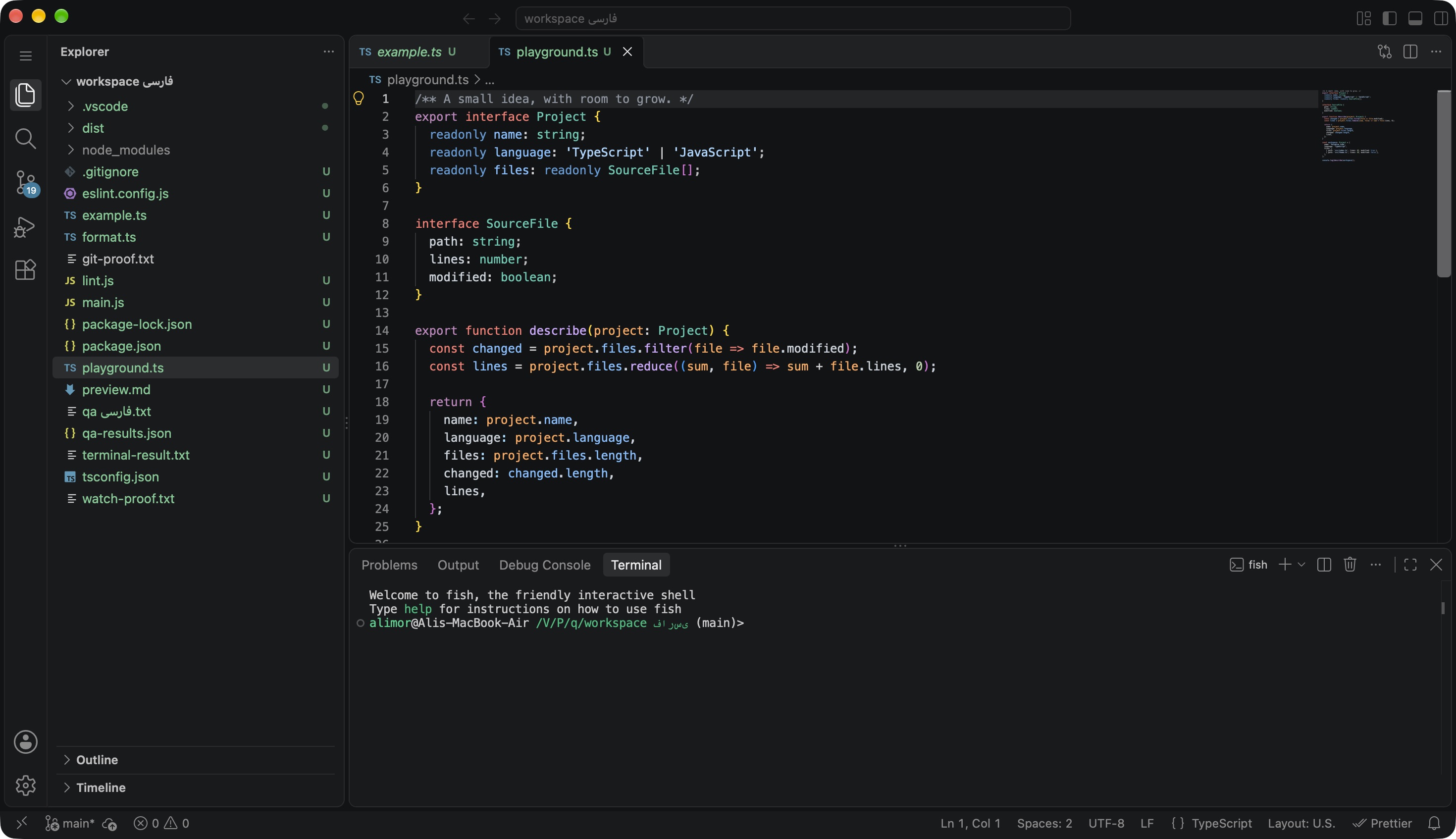
New foundation.
Same muscle memory.
No new way to open a file. No new shortcut to remember. Bring your project and get back to the part that matters.
Everything, where
your hands expect it.
Explorer. Tabs. Split editors. Search across your project. Review a diff, stage your changes, and keep moving.
- Familiar keyboard shortcuts
- Native Mac file and folder dialogs
- Light, dark, and high-contrast themes
One workspace.
The whole local loop.
Write TypeScript, run your app in a real terminal, execute Tasks, and pause at a Node breakpoint. Node and npm are bundled.
- Local development without an editor server in the cloud
- Web language IntelliSense
- Works offline with installed tools and dependencies
~/next-idea
$ npm install
$ npm run dev

# Edit. Run. Set a breakpoint.
# Your tools stay close.
Illustrative commands · use your project’s scripts
Your tools.
Your way of working.
Discover compatible extensions on Open VSX or install a VSIX. Keep your settings, themes, and keybindings in your own Paradise profile.
- ESLint and Prettier tested in our acceptance suite
- Standard .vscode project configuration
- Separate settings from your existing VS Code install
TypeScript & JavaScriptIntelliSense, navigation, refactoring
PrettierYour formatting, consistent
ESLintFeedback as you write
Feels at home.
Because it is.
A title bar that belongs to the editor. Mac menus and file dialogs. Finder file opening. Multiple windows. Small details that make a tool feel like yours.
Pick up where you left off.
Reopen your session, recover unsaved work, and keep your profile separate.
Updates you can verify.
Check for updates inside the app. Every update is signature-checked before installation, with a save-and-restart flow.
Open by construction.
Every choice is inspectable. Including the parts we’re still working on.
Code – OSS
The real workbench, not a recreated editor.
Tauri + Rust
A native shell using the Mac’s WebKit.
Local Node.js
Extensions and development tools on your Mac.
Better is something you measure.
A smaller bundle doesn’t automatically mean less memory. Our initial memory benchmark did not beat VS Code. We publish measurements and compatibility limits as we improve the implementation.
Make something
worth opening.
Paradise Code 0.3.1 for Apple Silicon.
Download for Apple SiliconPublic preview · macOS 14+ · M-series Macs
Tested on macOS 27. Intel, Windows, and Linux builds are not available.
From download to your first file.
Unzip. Move. Open.
Extract the ZIP and move Paradise Code.app into a writable folder, such as Applications.
Approve the preview on your Mac.
This release is ad-hoc signed, not Apple notarized. If macOS blocks it, verify its source, then use System Settings → Privacy & Security → Open Anyway.
Choose a project. Start building.
Open a folder with the Mac picker. Your editor runs locally. Updates are available from the Paradise Code menu.
A little clarity
before you commit.
How close is this to VS Code?
Paradise Code is built on Code – OSS 1.140.0. It retains the upstream workbench, standard .vscode files, and extension APIs. It is independent of Microsoft; Marketplace and proprietary services are not bundled. Compatibility depends on the extension.
Can I use it for my everyday work?
This is a public preview, with local web development as its tested path. Core workflows have acceptance tests, but it is not a production certification. Keep backups and check the published limitations before relying on an extension or workflow.
What’s included, and what isn’t?
Editing, local Git, terminal, Tasks, Node debugging, web IntelliSense, compatible Open VSX extensions, and signed updates. AI features, Remote SSH, Containers, and cloud settings sync are outside this release.
Does it need the internet to run?
No internet server is needed for the editor or its local backend. Downloads, extension installation, updates, and your own project’s network dependencies still need a connection.
Who’s behind Paradise Code?
Built by Paradise Code, on the work of the Code – OSS, Tauri, Rust, Node.js, and WebKit communities. The source is public under MIT; bundled components keep their own licenses.